Server Capability Inspector
Description
Know exactly what your WordPress server can do — in seconds, on one screen.
Every time you consider a new plugin or theme, the same fine print appears at the bottom of the listing: requires PHP 8.0, requires MySQL 5.7, needs the GD extension, 256MB memory, HTTPS, cURL with SSL. And every time, the same scramble begins — clicking through hosting dashboards, opening cryptic info pages, messaging your host's chat support and hoping they actually know.
Server Capability Inspector ends that scramble. One page. One score. Every answer.
What you get
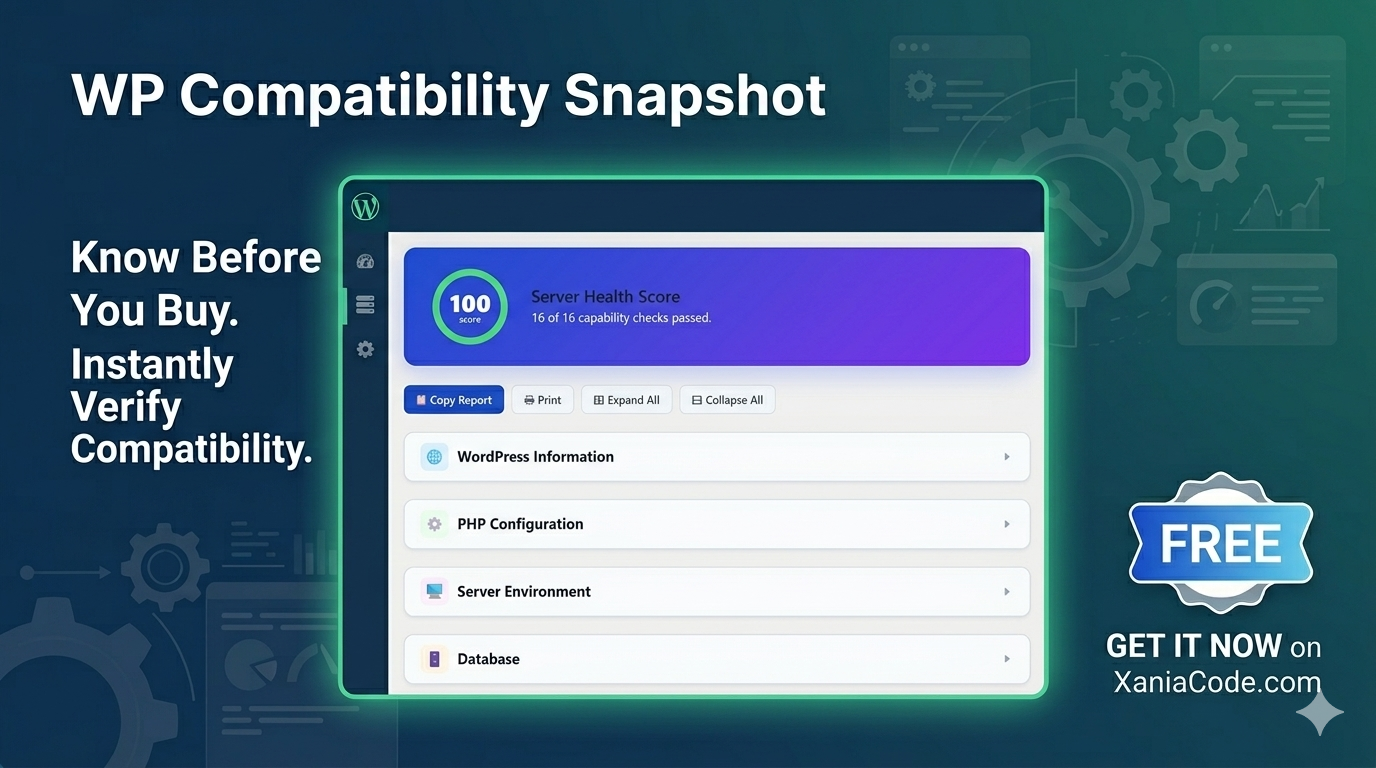
Open your WordPress admin, go to Tools → Server Inspector, and instantly see:
- A live health score from 0 to 100 with a colour-coded ring
- A list of failing checks so you know exactly what to fix
- Your full WordPress configuration — version, theme, language, memory, multisite, debug status
- Every PHP setting that matters for plugins and themes
- Your database engine, version, charset, and connection details
- Which directories are writable and how much disk space you have left
- Image processing support — JPEG, PNG, GIF, WebP, AVIF
- 50+ PHP extensions sorted into Required, Recommended, and Optional
- Your complete list of installed plugins with versions, authors, and status
- cURL, SSL, network, and email configuration
Every single value is shown on a single, scrollable page with collapsible sections, clear labels, and traffic-light indicators — green for good, amber for attention, red for trouble. You do not need to read a manual. You do not need to know what each setting means. The colour tells you whether it's healthy.
Why people install it
Before buying a plugin or theme. Open the inspector, glance at the score, check the failing-check badges. In seconds you know whether your server can run what you're about to buy — and what you'd need to upgrade if not. No more guesswork, no more disappointed installs.
When something breaks. Plugin won't load? Image uploads failing? Newsletters not sending? Open the inspector. The exact missing extension, low memory limit, or misconfigured setting is right there in red.
Before migrating to a new host. Run it on your current site, run it on the new server, compare. You'll see immediately whether the new host has everything your site relies on — before you move a single file.
When asking for help. Stuck on something and need to post in a forum or open a support ticket? The Copy Redacted button shares your server profile safely, with database host, file paths, IP addresses, and other private details automatically hidden. Get help without leaking sensitive information.
For client reports. Agencies and freelancers can print a clean, branded-free snapshot to send to clients or hosting providers as a record of where the site stands today.
Built for everyone
You don't have to be technical to use this. Every section has a plain-English label. Every setting comes with a clear visual indicator. The score ring at the top summarises the entire health of your server in a single number — read it like a battery percentage.
For those who want detail, expand the sections and read every value. For those who don't, glance at the ring and the badges and move on.
Made with care
- Clean, modern interface
- Light mode and dark mode (follows your system preference)
- Print-friendly output for filing or sharing
- Search and filter inside the extensions and plugins lists
- Fully accessible — keyboard navigation, screen reader support, WCAG AA compliant
- Available in your language (the plugin is fully translatable)
- Repeat views load instantly
Privacy by design
- Zero external requests. Your server data never leaves your site.
- Zero database changes. The plugin reads, it never writes.
- Zero tracking. No analytics, no telemetry, no usage statistics.
- Zero settings to configure. Install, open, done.
- Visible only to site administrators.
Free. Forever.
This plugin is free, with no premium version, no locked features, no time limits, and no upgrade prompts. Every capability listed above is available the moment you activate it. Install it once, keep it forever, use it on as many sites as you like.
We built it because we wanted a server inspector that was complete, looked good, and stayed out of the way. We're sharing it because every WordPress site owner deserves to know what their server can actually do — without paying for the privilege.
Download, install, and never wonder about your server again.
Changelog
First public release of Server Capability Inspector. The plugin lands fully featured — a single admin page that turns "will this plugin run on my server?" from a half-hour investigation into a 5-second glance, complete with a visual health score, redacted-sharing mode, and dark mode out of the box.
Server Health Score
- Circular SVG score ring at the top of the page with live 0-100 rating
- Twelve automated capability checks — PHP version, memory, SSL, cURL, writable dirs, required extensions, and more
- Color-coded ring — green above 80, amber 60-80, red below 60
- Failing-check badges shown next to the ring so you know exactly what to fix
- 60-second transient cache so repeat page loads are instant
WordPress Information Section
- Version, multisite status, theme, language, timezone, charset
- Memory limit and max memory limit pulled from WP_MEMORY_LIMIT
- Object cache detection — knows when an external cache like Redis or Memcached is wired in
- REST API live availability test (not just hardcoded "available")
- Cron disabled detection for environments using system cron
PHP Configuration Section
- PHP version, SAPI name, operating system, and Zend engine version
- Memory limit, post_max_size, upload_max_filesize, max_file_uploads, max_input_vars
- Max execution time and max input time
- Allow URL fopen, allow URL include, display errors flags
- OPcache detection that works even when opcache.restrict_api blocks the API
- Session save path and timezone
Server Environment Section
- Server software, protocol, HTTPS detection
- Server IP, hostname, document root, WordPress root, server port
- Every value sanitized through wp_unslash() and sanitize_text_field()
Database Section
- MySQL or MariaDB server version with full vendor string
- Distinct client library version (separate from server version)
- Database host, database name, charset, collation
- Table prefix and max_allowed_packet shown human-readable
Filesystem Section
- Writable status of uploads, wp-content, WP root, and temp directories
- Free disk space on the WordPress install path
- Graceful handling when disk_free_space() is restricted by open_basedir
- cURL & Network Section
- cURL version, SSL backend, libz version
- Supported protocols list, host triplet
- Clear "not available" warning when the extension is missing
Image Libraries Section
- GD version with format support breakdown — JPEG, PNG, GIF, WebP, AVIF
- Imagick version with supported format count
- Imagick instantiation wrapped in try/catch so restrictive policy.xml never crashes the page
Mail Configuration Section
- wp_mail() availability check
- SMTP host, SMTP port, sendmail path
PHP Extensions Section
- 50+ extensions checked and shown as color-coded pills
- Three-tier classification — required, recommended, optional
- Tier legend at the top so a missing optional extension doesn't trigger panic
- Inline search filter with debounced input
Installed Plugins Section
- Every plugin shown in a sortable table — name, version, author, requires PHP, requires WP
- Active, inactive, network-active, and MU-plugin statuses each color-coded
- Inline search across name, author, and version
- Multisite-aware — picks up plugins activated network-wide
Copy Report (Two Modes)
- Full report mode for private use — copies absolute paths, DB host, IP, table prefix
- Redacted mode for public sharing — masks 13 sensitive fields automatically
- Confirmation dialog before copying the full report so sensitive data never leaks by accident
- Clipboard API with execCommand fallback for HTTP/insecure-context environments
- Toast notification confirms copy success or surface failure clearly
Print-Friendly Output
- Dedicated @media print stylesheet
- Buttons, search inputs, gradients, and toasts hidden when printing
- Page-break-inside avoid on every section so reports don't split mid-card
- WordPress admin chrome (sidebar, toolbar, footer) hidden during print
Dark Mode
- Full dark theme that activates automatically with prefers-color-scheme
- Every section, pill, badge, and table re-themed with appropriate contrast
- Hand-tuned colors that pass WCAG AA contrast on both light and dark
Accessibility
- WCAG AA compliant — passes contrast and keyboard navigation tests
- ARIA labels on every status indicator, score ring, and section header
- Collapsible sections operable with Enter and Space keys
- Focus-visible outlines on every interactive element
- Screen-reader-only text for every emoji icon, score number, and toast message
- prefers-reduced-motion respected — animations disabled for users who request it
Developer Hooks
- sci_extensions_to_check filter — add, remove, or re-tier the extensions tested
- sci_health_checks filter — add or remove individual checks from the score
- sci_collected_data filter — full data snapshot before render
- sci_redacted_keys filter — define which keys are masked in shared reports
- sci_before_render and sci_after_render actions — wrap the output
Architecture
- PSR-4-style autoloader under XaniaCode\ServerInspector namespace
- Five focused classes — Plugin, DataCollector, ScoreCalculator, Renderer, Redactor
- declare(strict_types=1) on every PHP file
- Externalised CSS and JS — CSP-friendly, browser-cacheable, version-busted
- Single-responsibility template file consumed by the Renderer
- Translation-ready with bundled .pot file and proper text domain loading
- Activation guards for PHP 8.2 and WordPress 5.8 minimum
- Multisite-aware uninstall script that cleans up across every site
Frequently Asked Questions
Reviews
No reviews yet. Be the first to review this product!
Server Capability Inspector
Related Products

XC Product Filter Pro
Advanced product filtering for WooCommerce — real-time AJAX results, SEO-friendly clean URLs, a full SEO Rules engine, and a CSS inherit-theme system that adapts to any storefront design.

XC Shield
Privacy-first spam protection for WordPress forms — no Google, no reCAPTCHA, no tracking. XC Shield blocks bots and spam across comments, registrations, contact forms, and WooCommerce checkout using EU-hosted statistical analysis. Free, GDPR-compliant, set up in two minutes.

AI Content Generator Pro
AI Content Generator Pro connects your WordPress admin to Anthropic Claude and OpenAI GPT. Generate product listings, blog articles, translations, SEO titles, and Vision AI image-to-listing output — all from a single plugin, using your own API keys.
Message sent!
Ask about this product
Have a question about ? Send us a message and we'll reply within 24 hours.